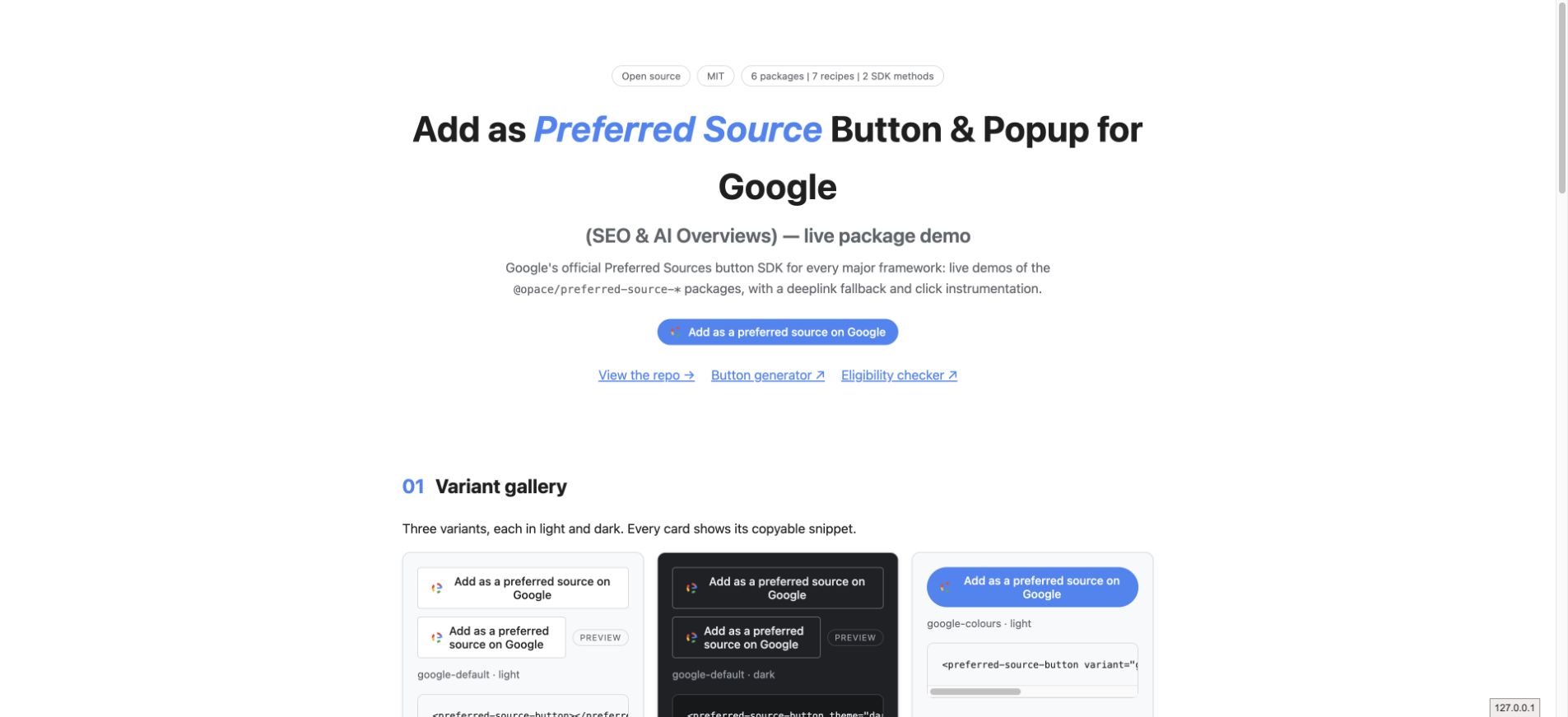
01 Variant gallery
Three variants, each in light and dark. Every card shows its copyable snippet.
<preferred-source-button></preferred-source-button><preferred-source-button theme="dark"></preferred-source-button><preferred-source-button variant="google-colours"></preferred-source-button><preferred-source-button variant="google-colours" theme="dark"></preferred-source-button><preferred-source-button variant="neutral"></preferred-source-button><preferred-source-button variant="neutral"
style="--ps-bg:#111; --ps-colour:#fff;"></preferred-source-button>02 Auto mode
With mode="auto" the component places an attributed
element in the light DOM and Google's SDK renders its own button into
it. Google's script loads happily on unrecognised origins (localhost,
GitHub Pages) yet silently paints nothing, so the component gives it
render-timeout milliseconds (default 4000) after the
script loads. If nothing appears it swaps to the deeplink fallback and
emits ps-fallback with reason: 'no-render' —
watch the event console below. That is the honest behaviour, not a
fault: the box never stays empty.
<preferred-source-button mode="auto" render-timeout="4000"></preferred-source-button>03 Deeplink fallback
When the SDK is blocked (ad blocker, consent tool, offline), every package falls back to Google's documented deeplink. If you run a content blocker, the buttons above are already showing you this state. This one is forced to the fallback URL for a specific domain:
<preferred-source-button
  href-fallback="https://www.google.com/preferences/source?q=opace.agency"></preferred-source-button>
04 Event console
Every ps-click, ps-ready and
ps-fallback on this page is appended below as JSON. This
is the instrumentation surface: clicks on triggers. Google's SDK has
no completion callback, so no event on any page can report a finished
add.
05 Source workspace and package names
npm i @opacedev/preferred-source-element

import '@opacedev/preferred-source-element/register';
npm i @opacedev/react-preferred-source
import { PreferredSourceButton } from '@opacedev/react-preferred-source';
<PreferredSourceButton theme="dark" variant="google-colours"
onPsClick={(d) => window.gtag?.('event', 'preferred_source_click', d)} />npm i @opacedev/vue-preferred-source
<script setup>
import { PreferredSourceButton } from '@opacedev/vue-preferred-source';
</script>
<template>
<PreferredSourceButton theme="dark" variant="google-colours" @ps-click="onClick" />
</template>npm i @opacedev/svelte-preferred-source
<script>
import { PreferredSourceButton } from '@opacedev/svelte-preferred-source';
</script>
<PreferredSourceButton theme="light" variant="neutral" on:ps-click={track} />npm i @opacedev/astro-preferred-source
// astro.config.mjs
import preferredSource from '@opacedev/astro-preferred-source';
export default defineConfig({ integrations: [preferredSource({ theme: 'dark' })] });
---
import { PreferredSourceButton } from '@opacedev/astro-preferred-source/components';
---
<PreferredSourceButton />06 Eligibility and limits
Eligibility. Preferred Sources works for domains
and subdomains only — www.example.com and
news.example.com qualify;
example.com/blog does not. The site must already
resolve in Google's
source preferences tool.
What click instrumentation means here. Google's SDK
exposes exactly two methods (init,
addPreferredSource) and no completion callback or
event. Nothing on the page can know whether the reader finished
adding your site inside Google's popup. Every event this library
emits (ps-click) measures clicks on the trigger, not
confirmed additions. Treat the numbers accordingly.